Skip to content

tAFK

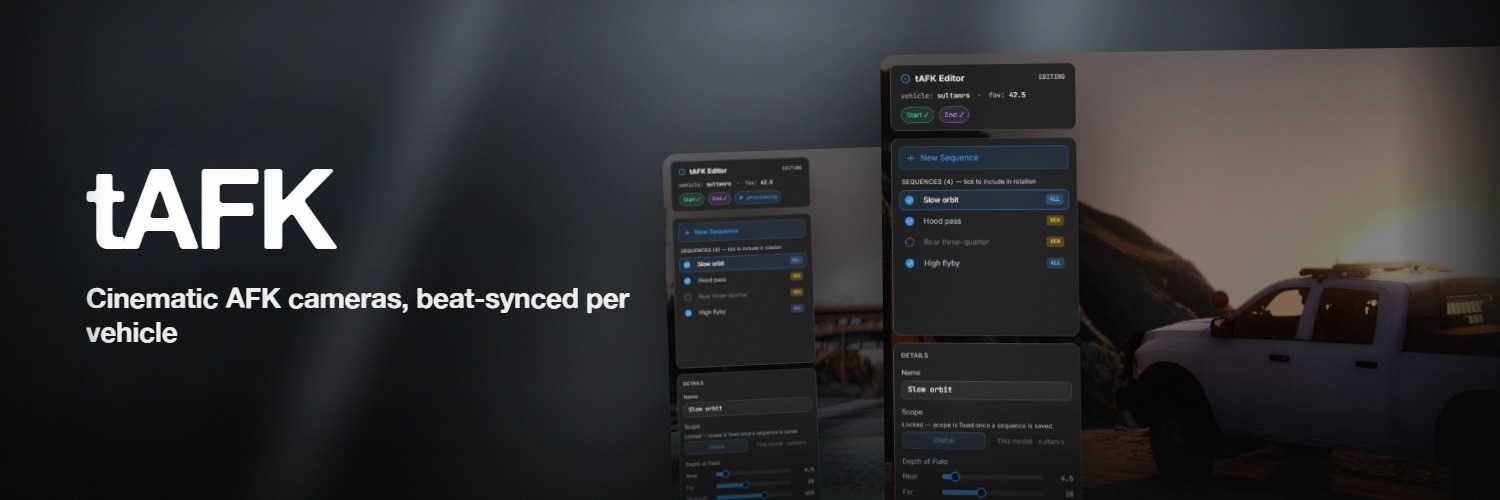
Cinematic AFK camera for FiveM — beat-synced cuts, per-vehicle sequence packs, authored in-game not in a file.

AFK systems in FiveM have always been disciplinary — a timer, a warning, a kick. tAFK is the opposite. When a player goes idle in a vehicle, their camera breaks out into a cinematic orbit of the car: depth of field, cuts that land on the beat, music underneath. Presence without interaction.

Any input at all puts them straight back in control.

11
camera shots included
30s
default idle before the camera takes over
0
players kicked, warned, or timed out
1
dependency — tLib, and it's free

This is not an anti-AFK script

tAFK never kicks, warns, or punishes idle players. It is a camera system that triggers on idle input. If you need session-timeout enforcement, combine tAFK with a separate kick script that reads Player(src).state.afk.

Requirements

RequirementDetail
OneSyncRequired — Infinity or Legacy
tLibv0.4+, free — download. The release zip, not the source
FrameworkNone. There is no framework code in tAFK, and none is needed
PortsNone. No external services
ScopeVehicles only — car, bike, boat, or aircraft. There is no on-foot camera
Lua5.4, handled by the manifest

Try it first

See it on the test server

Press F8 in FiveM, paste the line below, and press enter. Get in any vehicle and run /afk to trigger it on demand — or just sit still for 30 seconds and let it happen on its own.

Connect in FiveM

Quick start

  1. Extract the resource to your server's resources folder
  2. Start tLib before tAFK — ensure tLib then ensure tAFK in server.cfg
  3. Grant the tlib.admin ACE to whoever should author shots
  4. Drop your own music into audio/ if you want beat-synced cuts — any filename, any of .ogg / .mp3 / .wav
  5. Restart your server

Features

Eleven shots, shared by everyone

Eleven shots ship: low ground pans, headlight and taillight wipes, wheel-to-door tracks, grille-to-hood pushes, and rear-bumper detail tilts. Each is a pair of camera keyframes stored as offsets relative to the vehicle, so the same shot works on a Bati and a Phantom.

Server-authored shots live in data.json and stream to every client on boot; the cinematic itself renders on the player's own machine.

The director picks the shot, not a shuffle

Before every cut, each candidate is raycast — along its path and at both ends. Angles that clip the vehicle or its trailer, sit too close, repeat one of the last three shots, or start far from where the previous shot ended all lose points. Whatever survives goes into a weighted draw.

Offsets also scale to the vehicle, 0.8× to 2.5× of its bounding box, so one shot frames a motorbike and an articulated truck without being re-authored. Every run looks different; none of them look broken.

Authored in the vehicle, not in a file

/tafkedit (admin-gated) drops you into a free-fly camera around your car. MMB drag orbits, Shift+MMB pans, RMB looks around, the wheel adjusts FOV. WASD flies; Space and Ctrl are up and down; Shift for 3×, Alt for 0.3× fine-tune.

1 captures the start, reposition, 2 captures the end, 3 previews, 4 saves. Scope the shot globally or lock it to the current model. Naming, per-shot toggles, and depth-of-field live in the same overlay — no config files to edit.

Cuts on the beat

Drop any .ogg, .mp3, or .wav into audio/ and restart — any filename works. The server enumerates the folder on boot and adds every audio file it finds to the rotation. No naming convention, no manifest.

When a track plays, the interface analyses its tempo and offset in-browser and hands the timing back to Lua; cuts align to the next beat within the shot's min/max duration, with a configurable anticipation offset so the hit lands with the beat, not after.

No beat data? Durations fall back to random within range — the system still works, just without the sync.

The first shot of a session is never beat-synced

Tempo data from the interface has not arrived yet when the first shot is chosen, so shot one uses a plain random duration and ignores your configured bounds. Sync begins from the second shot onward.

Per-vehicle sequence packs

Vehicle resources can ship their own shots:

title="fxmanifest.lua" tafk_config 'tafk.json'
title="tafk.json" { "bati801": { "sequences": [ { "id": "bati_low_pass", "name": "Low Pass", "start": {...}, "end": {...} } ] } }

tLib's Discovery module scans every running resource on server start, merges matching-model shots into each client's lookup, and re-broadcasts when packs start or stop. Server-side admin edits always take priority, so pack shots act as defaults you can override.

Integrates through state bags

The moment a player enters or leaves AFK, tAFK sets LocalPlayer.state.afk and replicates it server-wide:

local afk = Player(playerId).state.afk   -- true | false | nil

No exports, no events, no polling. Radio, scoreboard, dispatch panels — anything that needs to know who is cinema-idle reads the state bag. Exports (IsAFK, StartAFK, StopAFK, ToggleAFK, IsAFKEnabled, SetAFKEnabled) cover local-client queries and programmatic toggles.

Players control their own experience

/tafk opens a settings dialog with master enable/disable, music override, volume override, HUD-hide toggle, and per-shot opt-outs — all persisted via tLib KVP, all surviving relogs. Server defaults inform the starting values; a player's override wins for their own client.

Admins see the same dialog plus global settings (timeout, duration bounds, beat anchor, music defaults) and an editor launch button when in a vehicle.


Questions people actually ask

Will this kick my idle players?

No — there is no timer, no warning, and no kick anywhere in it. It only changes the camera. For session enforcement, run a kick script alongside it that reads Player(src).state.afk.

Does it work on foot?

No. Vehicles only. A player outside a vehicle who runs /afk is told to get in one.

Why does it exit the moment I touch anything?

By design, and the sensitivity is deliberately high — even a small mouse movement counts as input, including during the fade in. That is what makes it safe to leave enabled for everyone.

Do I have to edit a config file to add camera angles?

No. Shots are captured in /tafkedit and saved from that overlay, which pushes them live. data.json is only read at start, so hand-edits need a restart tAFK. See Editor.

Will it fire during a cutscene, or while I'm ragdolled?

No. Cutscenes, player switches, and a ragdolled ped all block it, and two of those also end a cinematic already in progress. For your own scripts, use exports['tAFK']:SetAFKEnabled(false).


Pages

Installation

Dependencies, server.cfg setup, admin ACE, first-run behaviour.

Usage

Commands, auto-AFK flow, player settings, state-bag integration.

Editor

Orbit controls, keyframe capture, preview, save scope.

Configuration

The data.json schema, per-vehicle packs, admin settings.

API Reference

Exports, events, state bags, admin server events.