 TIMMYG Studios
Tommy's Radio
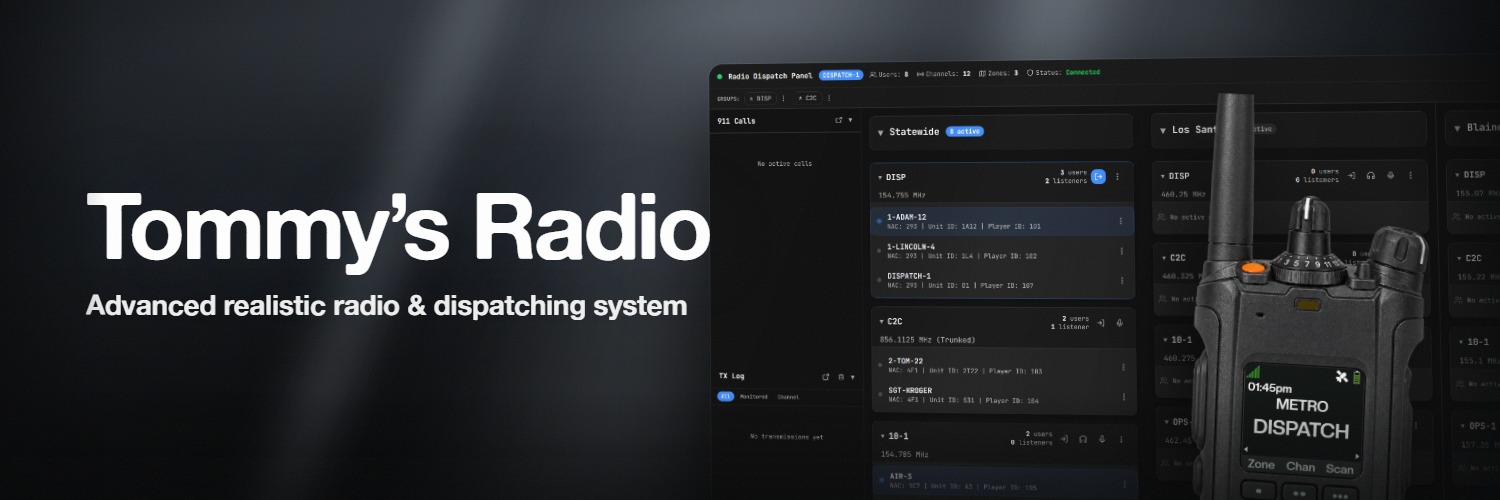
tRadio runs its own voice server and encodes speech with P25 IMBE — the vocoder real public-safety handhelds use.
Channels, trunking, codeplugs, a dispatch panel, 911 calls, 3D audio, station alerting and GPS ship in one resource. One config file, no extra port, nothing to sign up for.
- the vocoder real public-safety radios use
- P25 IMBE
- less bandwidth than Opus
- 3.7×
- frameworks auto-detected, or run standalone
- 6
- radio models included
- 11
- restarts to change a setting
- 0
Requirements
| Requirement | Detail |
|---|---|
| FiveM | Artifact 4752 or newer. Run version in your server console |
| tLib | v1.0+, free — download. No other dependency |
| OneSync | on. Positional features silently do nothing without it |
| Web access | Optional. Browser and desktop panels use tLib's port (default 7777) |
| Framework | Optional. ESX, QBCore, QBX, ND_Core, ox_core and nat2k15 auto-detect; standalone works |
| Voice | Runs alongside pma-voice or Mumble. It does not replace proximity voice |
Install
- Extract tLib and tRadio into
resources/ - Add
ensure tLibthenensure tRadiotoserver.cfg - Restart the server
- Join as
police,sheriff,ambulanceorfire, press F6, hold B
A new install is not empty: three zones, twelve channels, a working codeplug, four alerts and job mappings for those four jobs ship preconfigured.
Try it first
All three are live now, on one server, and none need a purchase.
The dispatch panel
The real panel, running against that server. Talk to the players on it from your browser.
Open the panel141The admin panel
Every setting a server owner touches — zones, channels, codeplugs, audio, alerts, speakers, towers. Change one and it reaches every connected client instantly.
Open the admin panel141Or get in the game
Press F8 in FiveM, paste the line below, press enter. Once you spawn in, press F6 and key up on a channel with the dispatchers above.
Connect in FiveMconnect fivem.timmygstudios.com
Features
Radio that sounds like radio
A real P25 Phase 1 vocoder (IMBE), with M17's Codec 2 selectable per channel. P25 is set per channel, so a digital dispatch channel and an analog tac channel live on the same radio, with an analog FX chain on top of either.
Conventional and trunked channels
Conventional is one shared frequency. Trunked assigns units to sub-frequencies by location, so crews across the map stop stepping on each other. Patching bridges channels on the fly and survives a restart, and a floating channel list shows who is on with you and who is transmitting.
Codeplugs — one radio per department
A codeplug is a radio personality: which channels a unit may transmit on, which it may only scan, which models it may carry, what its emergency button does, and whose GPS blips it sees. Map jobs to codeplugs in one table, optionally per rank. Unmapped jobs get no radio.
leo              = { jobs = { police = 0 } },
['leo-command'] = { jobs = { police = 8 } },A dispatch panel that dispatches
A browser panel plus a Windows app with global push-to-talk and auto-updates. Transmit to any channel, patch frequencies, arm announcement groups, trigger alerts, answer 911 calls, replay buffered traffic and assign callsigns.
Speakers you can place, tones you can drop
Stand where you want a speaker, run /tradio_debug coords, and paste the position into Coverage → Speakers with a radius and an optional prop. A dispatcher picks a tone and presses a speaker or group; it plays at those coordinates in 3D. Nobody outside the radius hears it.
A working 911 line
Players dial /911, or 911 on their LB Phone, and land in a queue with their number, unit ID, location and message. Callers speak hands-free over voice activation and press ESC to hang up. No radio or codeplug is needed to call. It ships off — turn it on in Settings → General → 911 Calling. See 911 calls.
Radio in 3D space
Players near a talker hear their radio at their position — voice, tones, the siren loop, rotor noise and gunshots fired mid-transmission. A player wearing earbuds is heard by nobody around them — their radio audio goes to their ears — and a configured earpiece item switches earbuds on for them. See 3D audio.
A radio that lives in the dash
A streamed prop with a live display mirroring the player's own radio. Walk away and it takes over as the audio source at extended range. Place it per vehicle in game, with 3D Prop Editor in /tradio's sidebar.
Coverage you can plan — and lose
Signal towers go in at coordinates you pick, and strength falls off with distance. Turn on degradation and a weak signal chews up the audio. Geo zones switch a unit to a local channel as they walk in, opt-in per player.
Tune every knob, live
The admin panel covers the FX chain, coverage, half-duplex bonking, 3D ranges, GPS blip rate, man-down timers, 911 cooldowns, keybinds and default layouts. Changes broadcast to every client instantly.
Details that sell the illusion
Battery drains on foot and charges in any vehicle, chirping under 50% and cutting out at zero. Man-down escalates from a warning tone to a full emergency. Keying over another transmission earns a bonk, with a double-tap override. Every one is a toggle, and every player-facing string is translatable.
Built to be customized
Radio models are HTML and CSS folders in layouts/ — eleven ship. Thirty-nine tone slots remap globally or per model. A full Lua export surface, a REST API and a Socket.IO stream cover anything the UI does not.
Make the dispatch panel yours
Five themes ship built in. Beyond that: recolor with design tokens, restyle with CSS, replace individual components, or rebuild the console with a declarative template. See theming.
One click, no code, no restart
Radio UIs, dispatch themes and tones install from Admin Panel → Marketplace and appear in every player's style picker the next time they open the radio. No file transfer, no restart.
Drive it from a Stream Deck
An official plugin turns an Elgato Stream Deck into a live radio panel: channel and zone on the key, signal bars, who is talking, panic in red, the 911 queue count. It drives both the in-game radio and the panel, with no companion app. Free with the resource. See Stream Deck.
A dispatcher when you don't have one
A unit says "Dispatch, 1-Adam-12, I'll be 10-8" and gets an answer on the same channel through the same P25 chain. It knows who is on the channel, how far away each unit is, and the last few minutes of traffic.
Point it at an API key for the writing and the voice, or run both on models on your own machine with no account anywhere. What it does with an alert, a tone or a patch is your server's procedure, written in plain English in one config hook.
Plays well with your stack
Auto-detects six frameworks; access refreshes the moment a job changes. Discord OAuth gates the panels by role. Optional integrations mirror 911 calls into six CAD and MDT systems, hook dialing into LB Phone, and surface status in LB Radio. Satellite mode federates several servers onto one radio network.
Specifications
Compatibility
- FiveM artifact
- 4752 or newer
- Frameworks
- Standalone, ESX, QBCore, QBX, ND_Core, ox_core, nat2k15 — auto-detected
- Dependencies
- tLib v1.0+ (free). Nothing else
- Voice
- Runs alongside pma-voice / Mumble, does not replace it
- Ports
- Optional web access and federation use tLib's port (default
7777) - Multi-server
- Satellite federation onto one shared voice server and panel
What stays open
- Protection
- FiveM Asset Escrow
- Editable, unencrypted
config.lua,cl_functions.lua,sv_functions.lua,locales.json,layouts/,data.json- Framework hooks
- All of them, in
sv_functions.luaandcl_functions.lua - Extension points
- Lua exports, REST API, Socket.IO events, theme SDK
What is included
- Radio models
- 11, plus marketplace installs
- Tone slots
- 39, remappable globally or per model
- Dispatch themes
- 5 built in, more from the marketplace
- Dispatch app
- Browser panel + Windows desktop app with global PTT
- Stream Deck
- Official plugin, free with the resource
- Marketplace
- One-click UIs, themes, and tones from the admin panel — no restart
- Preconfigured
- 3 zones, 12 channels, a working codeplug, 4 alerts
- AI dispatcher
- Optional, off by default. Runs locally — ~2 GB RAM, no port, no account
Questions people actually ask
Only to publish the panels to a browser or the desktop app, or to host a federation — and that uses tLib's port. See optional browser access.
No. It runs alongside pma-voice and Mumble and does not replace proximity voice.
Yes. config/config.lua, both function-hook files, config/locales.json and layouts/ ship
unencrypted. locales.json is the complete string table, so any wording in the radio or the
panels is yours to rewrite or translate. Everything else is a setting in the admin panel.
Your zones, channels, codeplugs, alerts and settings always. Four files are yours to keep when
you copy the new files in: config/config.lua, config/cl_functions.lua,
config/sv_functions.lua and config/locales.json, plus any layouts/ you edited. See
updating.
The AI dispatcher, the scanner, transmission playback, the CAD integrations and the LB Phone / LB Radio integrations. Each has its own switch, and nothing else depends on them. Trunked channels cannot be patched.
Tommy's Radio
Still stuck? Support can answer it directly.
Was this page helpful?