 TIMMYG Studios
tLS
$19.99
BuyTommy's Lighting System
Emergency lighting for FiveM. Configured in the vehicle, not in a file.
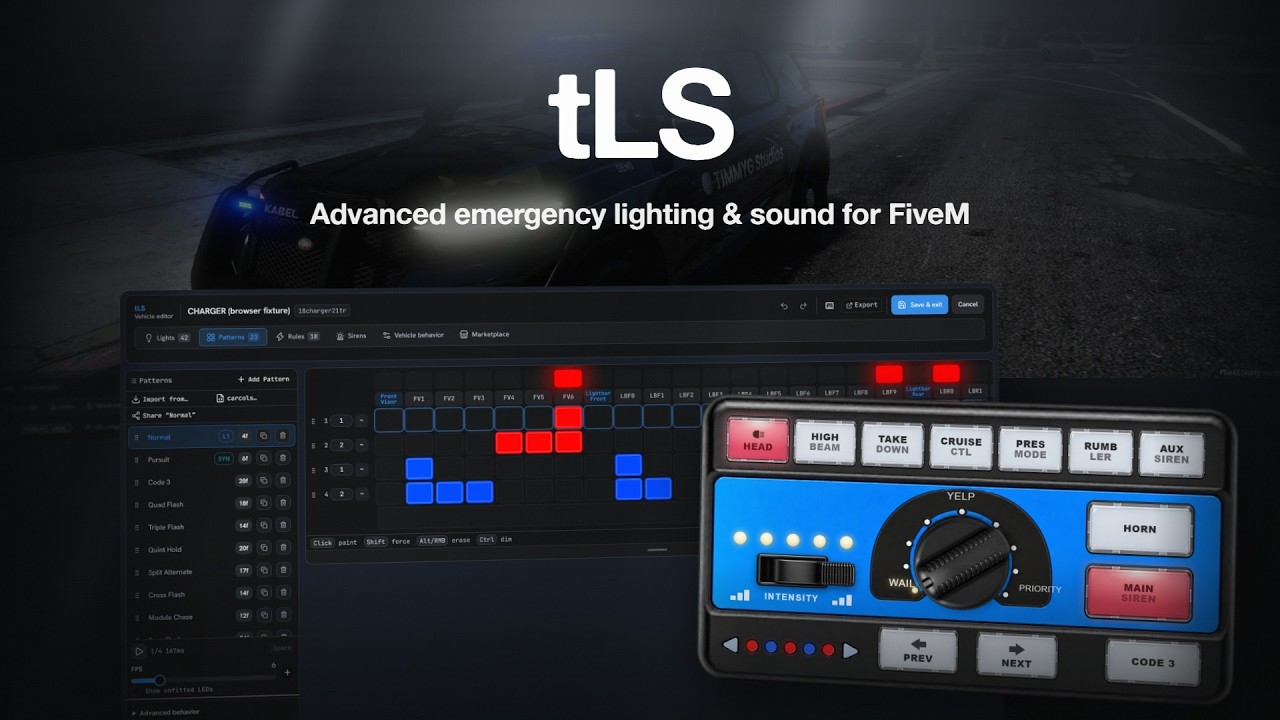
tLS Teaser
1 / 14
One-time purchase. The copy you download is yours to keep; updates while it is sold.
Powered by Tebex. Instant delivery to your Cfx.re account. Refund policy.
Roadmap
View board- 2In Progress
Marketplace
Browse add-ons25 community add-ons, free to install
- 16Lighting patterns
- 5LED layouts
- 2UI layouts
- 2Vehicle setups
FiveM usage
| Day | Servers |
|---|---|
| 8 Nov 2026 | 15 |
| 9 Nov 2026 | 13 |
| 10 Nov 2026 | 14 |
| 11 Nov 2026 | 15 |
| 12 Nov 2026 | 15 |
| 13 Nov 2026 | 15 |
| 14 Nov 2026 | 16 |
- 16
- Servers
- 7
- Players
- #38,836
- Rank
Description
Emergency lighting in FiveM has always meant patterns compiled into a vehicle resource. Every flash-rate change, every LED nudge, every siren swap means editing a file, reuploading, and restarting.
tLS throws that pipeline out. Sit in the vehicle, run /tlsedit, place LEDs on the 3D model with a gizmo, paint patterns on a grid, and wire up the rules that fire them. Save, and every connected client has it — no restart, no reupload, no per-vehicle files.
- LEDs per vehicle — the game gives a carcols siren set 20
- 64
- siren IDs used, so your fleet never meets the 255 ceiling
- 0
- vehicle-state conditions you can combine
- 74
- siren tone slots, on two channels
- 8
Will it run on your server?
- OneSync, Infinity or Legacy.
- tLib v1.0 or newer — free, and the only dependency.
- No framework needed. There is no framework code in it — nothing to detect, nothing to wire up.
- pma-voice is optional, and only for the PA microphone. Everything else works without it.
- Your vehicles work; their pattern files do not come with them. Be clear on which half is which. LED placement is generated from the model — including an ELS car, whose extras are read in place of siren bones — so you are not rebuilding a fleet by hand. What is not converted is an ELS or non-ELS pack's pattern files; those you rebuild in the editor, which is minutes per vehicle rather than an afternoon. The one exception runs in your favour: a vehicle's own
carcols.metasiren set is rebuilt into a Stock pattern as its LEDs are created.
What you stop dealing with
tLS draws its own LEDs. It does not register a siren setting, so the limits that come with carcols lighting are not limits it has.
- Any model, including one nobody prepared. Attaching an LED to a bone is optional — you place it where you want it on the vehicle you are sitting in. The model needs no ELS build, no
carcols.metaentry and nothing from whoever made it. A model with no siren bones at all still works; Auto-create LEDs reads the model for its lenses and falls back to those bones, so it is a one-click starting point either way. - No 20-siren ceiling. A vanilla siren set holds 20 sirens. tLS renders up to 64 LEDs per vehicle, so a full bar plus runners, rear deck, grille and mirrors is one vehicle rather than a compromise. Raising the game's own cap to 32 needs a client-side mod installed by every player, which no public server can require.
- No 255-setting fleet ceiling. The game addresses siren settings with an 8-bit id, so a server has 255 of them for every vehicle it runs — PD, fire, EMS, DOT and civilian together. It is hardcoded, there is no server-side fix, and large packs hit it. tLS consumes none of them, so your fleet size is not capped by your lighting.
- Patterns stay patterns. They are not baked into a vehicle file you have to ship and re-ship. Save in the editor and the change is live on every client — no restart, no redownload, nobody rejoining.
Try it before you buy it
See it on the test server
Press F8 in FiveM, paste the line below, and press enter. Get in a marked vehicle and open /tls for the lights and sirens, or /tlsedit to open the 3D editor on the car you are sitting in and move the LEDs yourself.
Connect in FiveMconnect fivem.timmygstudios.com
What you get
Build the lightbar from the driver's seat
/tlsedit opens a 3D editor over the vehicle you are sitting in. Drag LEDs into place with a gizmo, rotate and scale them, attach them to bones so they follow a door or the hood, and group them by location.
Starting from nothing? Auto-create is one button, and it reads the vehicle's own model to do it.
FiveM gives Lua no access to a model's geometry, which is why this normally means an offline
tool or a website. It does not have to: the server runs Node, so tLS reads and decompresses
the .yft itself — a 3.3 MB model inflates in about 13 ms. Nothing leaves the machine and you
never handle a file, because you are sitting in the car and the editor already knows which
model to ask about.
The siren bones say how many lamps there are and roughly where. The lens face each one sits behind says the rest — position, which way it points, and how big it is. That matters because on plenty of models the bone itself is unoriented, so reading the bone alone gets you a light aimed at nothing in particular.
Measured against four hand-built configurations: every lamp found, 42/42, 38/38, 28/28 and 32/32, with yaw inside 0.1–4.6°, roll inside 0.6°, and sizes within 6–20 mm of what a person had set by hand. It keeps neighbouring modules in the same assembly too, so a module a pitch away from its bone lights as brightly as the bone's own.
An ELS car has no siren bones at all. Its extra_1…extra_12 are read as the channels
instead, by the same naming ELS uses, and lens arrays found by texture are kept — so a visor,
grille and plate lights still come out.
If the vehicle resource ships a carcols.meta siren set, that stock flash is rebuilt as a
pattern named Stock, added alongside your patterns rather than replacing one. If it ships
none, you get a Code 3 quad flash instead. The LEDs come out named, grouped and sided; from
there multi-select, duplicate, mirror across the centreline, or batch-edit a whole group.
Already have a lightbar? It rebuilds its stock pattern
One button. tLS reads the vehicle's own files on the server, places an LED on every lens the model lights, and converts the siren set that model uses — sequences, flash rate, phase offsets, per-head colours — into a real tLS pattern you can then edit like any other. No file to find and nothing to paste.
It is the difference between rebuilding a fleet and importing one.
Patterns painted on a grid
LEDs run across the top, frames down the side. Click a cell to colour it. Each pattern carries its own palette, its own frame rate, and per-frame durations — and cells marked dimmable fade into the next frame instead of snapping.
It previews on the real vehicle while you edit, so what you see in the editor is what the street sees.
74 conditions, combined how you like
Not a preset dropdown. Speed bands, individual gears, steering angle, brake, handbrake, each door, lock state, body damage, seat occupancy, the in-game clock, someone approaching the car — joined with AND/OR and negated per condition, driving 18 kinds of action.
Speed > 30ANDLights ActiveAND NOTCustom Pattern→ Set Stage 2
Audio that matches the lights
Eight tone slots per vehicle across a main and an auxiliary channel, plus a separate airhorn chain and a rumbler variant per tone. Every slot holds a vanilla game sound and, optionally, a server-side one — players pick which they hear.
Twelve custom tones ship. Horn gestures — tap, hold, double-tap — are conditions in their own right, so the horn can drive the lights.
A fleet that flashes together
Set a pattern to Sync Near and every client locks its frame index to a server clock instead of to whenever that car's lights came on. Ten units at one scene run in step, and they stay in step — nothing drifts back apart, because no client is keeping its own time.
That is the whole of what a separate sync script does, and it is a per-pattern setting here.
Base patterns, and patterns layered over them
A vehicle runs a base pattern; rules layer others on top of it while they are true. Where two overlays reach the same LED, the one further down the Patterns list wins — so priority is something you drag, not something you encode.
It is what makes one vehicle behave differently in three stages without three vehicles. Stages 1–3 are not fixed behaviour either: they mean whatever you wire to them, and with no stage rules at all Q is a plain on/off toggle. On top of that sit cruise, takedown, the traffic advisor, rumbler, blackout and six custom functions whose meaning is entirely yours.
The park chirp is one rule, not another resource
park_kill fires on its own when a driver exits with the siren running. Point one rule at it
— IF park_kill THEN park_chirp — and the vehicle chirps: a 75–125 ms burst every
4–6 seconds, latched until something stops it. Pick which tone slot it uses, or hold the full
siren for the whole chirp instead.
Worth being straight about what that means: tLS ships patterns, not rules. Five come with it — quad, triple, alternating, slow cruise and all-flash — and out of the box Q toggles the lights, R bursts the siren and 9/0 step patterns. Every behaviour past that — chirp, cruise, takedown, the traffic advisor, what each stage means — is a rule you build, which is why one system covers all of them instead of shipping some and not the others.
Configure one car, deploy it to twenty
{ "$ref": "police4", "$all": true }Point one vehicle at another instead of copying it. Edit the source and every vehicle referencing it updates. Orphans clean themselves up, and a vehicle resource can ship its own tls.json as a starting point — your edits always win over the pack's.
Built for a scene, not a screenshot
Ten units on one traffic stop is the case that matters. Vehicles beyond 500 m are skipped entirely, ones behind the camera are culled, lighting quality steps down with distance, and the expensive door/lock/occupancy checks only run for vehicles whose own rules ask for them.
Set environmental lighting to Smart and it watches frame time, easing quality up at 90 fps and back down at 75 so it settles instead of flickering between the two.
Also included
- A community config library, in game. Browse and download vehicle configs other people have published, or upload your own, without leaving the editor.
- Auto-calibration. One button samples your screen and suggests bloom and vibrance settings that suit whatever graphics mod you run, so the lights read correctly under an ENB or a dark timecycle.
- HUD skins and sound packs from the marketplace — installed from the panel, no restart.
- A PA microphone. Hold to talk through the vehicle, with a range slider and three voice presets.
- Presence detection. A locked, armed vehicle wakes up when someone walks near it.
- A HUD layout SDK. Layouts are HTML and CSS with declarative bindings — around fifty state keys, per-layout icons and button sounds.
- Read state with no round trip. One
tls:syncentity key carries all twenty-one lighting and siren fields in a single table, readable from any script with no round trip and no per-field replication.
Specifications
Compatibility
- OneSync
- Required — Infinity or Legacy
- Frameworks
- None needed. No framework code, nothing to detect
- Dependencies
- tLib v1.0+ (free). Nothing else
- Optional
- pma-voice, for the PA microphone only
- Vehicle packs
- ELS and non-ELS pattern files do not migrate — tLS rebuilds the stock pattern instead
- Lua
- 5.4, handled by the manifest
What stays open
- Protection
- FiveM Asset Escrow
- Your configuration
data.json— every vehicle and every server default, plain JSON- HUD layouts
layouts/— HTML, CSS, JavaScript, icons, and sounds, all yours- Extension points
- 27 client exports, 4 entity state-bag keys, 22 network events
- Vehicle bundling
tls_configandtls_led_pngmanifest keys
What is included
- Trigger conditions
- 74, across 13 categories, driving 18 action types
- Siren tones
- 8 slots per vehicle; 12 custom tones plus 14 game sounds
- Editor
- LEDs, patterns, triggers, sirens, and settings, all in game
- Stock patterns
- Rebuilt from the vehicle's own siren set, as editable patterns
- HUD
- Two layouts included — CRX-600 and SPX-1800; more from the marketplace, no restart
- LEDs per vehicle
- Up to 64 rendered at once
Buying it
- Updates
- Included while the product is sold
- Support
- Discord, with a purchase-linked role
- Refunds
- 7-day money-back guarantee
- Status
- Beta — see the questions below
Questions people actually ask
Not automatically — their pattern files don't migrate, and the data model is different. But the
editor reads a vehicle's own carcols.meta and turns the siren set that model uses into a tLS
pattern as it creates its LEDs, so a working lightbar is usually one button and a few edits
rather than a rebuild.
That is the case it was built for — distance cut-off, frustum culling, quality that steps down with distance, pre-allocated buffers, and condition checks that only run for vehicles whose rules need them. There is no published benchmark, so those are mechanisms rather than a number.
Yes — 64 are rendered at once per vehicle. That is plenty for a patrol car or a full lightbar build, but a heavily-lit fire apparatus can reach it.
In one data.json at the resource root — every vehicle and every server default. It is
written by tLS on first boot and is not part of the download, so extracting a new release
over the top of the folder leaves it untouched. Your own edits also take priority over
anything a vehicle resource ships, so customisation survives a vehicle-pack update too.
Back that one file up all the same.
It uses a wide set — Q, R, E, 1-8, 9/0 and more — so a collision with an inventory or radio script is likely. Every one is registered through FiveM's keybind system, so you and your players can rebind any of them.
It means the feature set is still moving and you should expect changes between releases. It is in use and it works. Ask in the Discord before you buy if that matters to you.
How it compares
Sourced comparisons against other scripts in the same category. Every claim about them is quoted from their own public pages.