TIMMYG Studios
tELS
$19.99
BuyTommy's ELS
Emergency lighting for FiveM. Configured in the vehicle, not in a file.
tELS Trailer
1 / 14
One-time purchase — lifetime access to this product, for as long as we continue to offer it.
Powered by Tebex. Instant delivery to your Cfx.re account. Refund policy.
Marketplace
Browse add-ons16 community add-ons, free to install
- 12Lighting patterns
- 2LED layouts
- 2UI layouts
FiveM usage
| Day | Servers |
|---|---|
| 17 Oct 2026 | 10 |
| 18 Oct 2026 | 10 |
| 19 Oct 2026 | 11 |
| 20 Oct 2026 | 12 |
| 21 Oct 2026 | 10 |
| 22 Oct 2026 | 13 |
| 23 Oct 2026 | 11 |
- 11
- Servers
- 10
- Players
- #53,581
- Rank
Description
Emergency lighting in FiveM has always meant patterns compiled into a vehicle resource. Every flash-rate change, every LED nudge, every siren swap means editing a file, reuploading, and restarting.
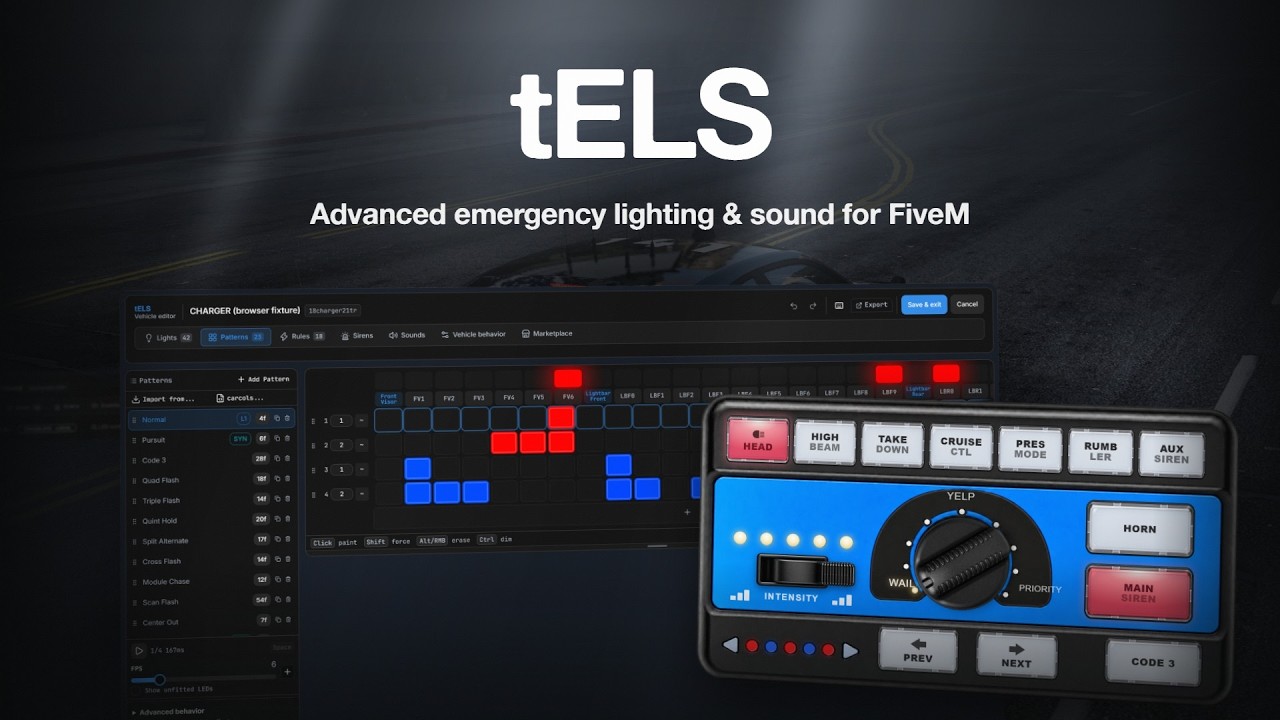
tELS throws that pipeline out. Sit in the vehicle, run /telsedit, place LEDs on the 3D model with a gizmo, paint patterns on a grid, and wire up the rules that fire them. Save, and every connected client has it — no restart, no reupload, no per-vehicle files.
- vehicle-state conditions you can combine
- 74
- siren tone slots, on two channels
- 8
- files to edit — it's all built in game
- 0
- dependency — tLib, and it's free
- 1
Will it run on your server?
- OneSync, Infinity or Legacy.
- tLib v1.0 or newer — free, and the only dependency.
- No framework needed. There is no framework code in it — nothing to detect, nothing to wire up.
- pma-voice is optional, and only for the PA microphone. Everything else works without it.
- It is not a drop-in replacement for ELS or non-ELS vehicle packs. Their pattern files do not migrate. You build each vehicle in the editor — or import its
carcols.meta, which gets you most of the way in one paste.
Try it before you buy it
See it on the test server
Press F8 in FiveM, paste the line below, and press enter. Get in a marked vehicle and open /tels for the lights and sirens, or /telsedit to open the 3D editor on the car you are sitting in and move the LEDs yourself.
Connect in FiveMconnect fivem.timmygstudios.com
What you get
Build the lightbar from the driver's seat
/telsedit opens a 3D editor over the vehicle you are sitting in. Drag LEDs into place with a gizmo, rotate and scale them, attach them to bones so they follow a door or the hood, and group them by location.
Starting from nothing? Create from siren bones reads the model's own siren1…sirenN bones and drops a grouped, sided starter bar in one click. Multi-select, duplicate, mirror across the centreline, or batch-edit a whole group.
Already have a lightbar? Paste its carcols
Copy a vehicle's carcols.meta, paste it into the importer, pick a siren set, and tELS converts its sequences, flash rate, phase offsets, and per-head colours into a real tELS pattern you can then edit like any other.
It is the difference between rebuilding a fleet and importing one.
Patterns painted on a grid
LEDs run across the top, frames down the side. Click a cell to colour it. Each pattern carries its own palette, its own frame rate, and per-frame durations — and cells marked dimmable fade into the next frame instead of snapping.
It previews on the real vehicle while you edit, so what you see in the editor is what the street sees.
74 conditions, combined how you like
Not a preset dropdown. Speed bands, individual gears, steering angle, brake, handbrake, each door, lock state, body damage, seat occupancy, the in-game clock, someone approaching the car — joined with AND/OR and negated per condition, driving 18 kinds of action.
Speed > 30ANDLights ActiveAND NOTCustom Pattern→ Set Stage 2
Audio that matches the lights
Eight tone slots per vehicle across a main and an auxiliary channel, plus a separate airhorn chain and a rumbler variant per tone. Every slot holds a vanilla game sound and, optionally, a server-side one — players pick which they hear.
Twelve custom tones ship. Horn gestures — tap, hold, double-tap — are conditions in their own right, so the horn can drive the lights.
Configure one car, deploy it to twenty
{ "$ref": "police4", "$all": true }Point one vehicle at another instead of copying it. Edit the source and every vehicle referencing it updates. Orphans clean themselves up, and a vehicle resource can ship its own tels.json as a starting point — your edits always win over the pack's.
Built for a scene, not a screenshot
Ten units on one traffic stop is the case that matters. Vehicles beyond 500 m are skipped entirely, ones behind the camera are culled, lighting quality steps down with distance, and the expensive door/lock/occupancy checks only run for vehicles whose own rules ask for them.
Set environmental lighting to Smart and it watches frame time, easing quality up at 90 fps and back down at 75 so it settles instead of flickering between the two.
Also included
- A community config library, in game. Browse and download vehicle configs other people have published, or upload your own, without leaving the editor.
- Auto-calibration. One button samples your screen and suggests bloom and vibrance settings that suit whatever graphics mod you run, so the lights read correctly under an ENB or a dark timecycle.
- HUD skins and sound packs from the marketplace — installed from the panel, no restart.
- A PA microphone. Hold to talk through the vehicle, with a range slider and three voice presets.
- Presence detection. A locked, armed vehicle wakes up when someone walks near it.
- A HUD layout SDK. Layouts are HTML and CSS with declarative bindings — around fifty state keys, per-layout icons and button sounds.
- State bags, not exports. One
tels:syncentity key carries all twenty-one lighting and siren fields in a single table, readable from any script with no round trip and no per-field replication.
Specifications
Compatibility
- OneSync
- Required — Infinity or Legacy
- Frameworks
- None needed. No framework code, nothing to detect
- Dependencies
- tLib v1.0+ (free). Nothing else
- Optional
- pma-voice, for the PA microphone only
- Vehicle packs
- ELS and non-ELS pattern files do not migrate — see the carcols importer
- Lua
- 5.4, handled by the manifest
What stays open
- Protection
- FiveM Asset Escrow
- Your configuration
data.json— every vehicle and every server default, plain JSON- HUD layouts
layouts/— HTML, CSS, JavaScript, icons, and sounds, all yours- Extension points
- 27 client exports, 4 entity state-bag keys, 22 network events
- Vehicle bundling
tels_configandtels_led_pngmanifest keys
What is included
- Trigger conditions
- 74, across 13 categories, driving 18 action types
- Siren tones
- 8 slots per vehicle; 12 custom tones plus 14 game sounds
- Editor
- LEDs, patterns, triggers, sirens, and settings, all in game
- Carcols import
- Converts a vehicle's siren sets into editable patterns
- HUD
- Two layouts included — CRX-600 and SPX-1800; more from the marketplace, no restart
- LEDs per vehicle
- Up to 64 rendered at once
Buying it
- Updates
- Included, forever
- Support
- Discord, with a purchase-linked role
- Refunds
- 7-day money-back guarantee
- Status
- Beta — see the questions below
Questions people actually ask
Not automatically — their pattern files don't migrate, and the data model is different. But the
editor can import a vehicle's carcols.meta and turn its siren sets into tELS patterns, so a
working lightbar is usually a paste and a few edits rather than a rebuild.
That is the case it was built for — distance cut-off, frustum culling, quality that steps down with distance, pre-allocated buffers, and condition checks that only run for vehicles whose rules need them. There is no published benchmark, so those are mechanisms rather than a number.
Yes — 64 are rendered at once per vehicle. That is plenty for a patrol car or a full lightbar build, but a heavily-lit fire apparatus can reach it.
In one data.json at the resource root — every vehicle and every server default. It is
written by tELS on first boot and is not part of the download, so extracting a new release
over the top of the folder leaves it untouched. Your own edits also take priority over
anything a vehicle resource ships, so customisation survives a vehicle-pack update too.
Back that one file up all the same.
It uses a wide set — Q, R, E, 1-8, 9/0 and more — so a collision with an inventory or radio script is likely. Every one is registered through FiveM's keybind system, so you and your players can rebind any of them.
It means the feature set is still moving and you should expect changes between releases. It is in use and it works; it is not yet listed publicly. Ask in the Discord before you buy if that matters to you.